An Orchestrated Dynamic Mixture of Mixture of Agents
Inspired by human teams, a Mixture of Mixture of Agents (MoMoA) architecture can improve quality and consistency by strictly separating orchestration, execution, tool use, and validation; and providing specialized prompts to create a system with multiple independent agents designed to catch and fix mistakes. By actively encouraging these agents to argue and dissent, we break them out of the “confident yet blindly compliant” echo chamber that can limit single-/shared-context agents.
When you’re writing software, there’s nothing quite like the feeling when your idea becomes real. That moment will always feel like a kind of ✨magic✨
As developers, we’re living through a unique moment—the way we harness and direct that magic is being transformed, fundamentally changing how we write software. The tools we use to write software are also software, so we get to build our own tools! And because I love a self-referential meta-loop, I’m using the tools I build to build the tools I use to build those tools.
To keep that magical feeling of exploration, discovery, and actualization alive as our tools evolve, I need two things: A non-judgmental brainstorming partner, and the ability to ruthlessly delegate the ‘boring’ toil (and help with things I’m bad at).
Inspired by Jules, the MoMoA experiment is focused on delegation: How much can we delegate and still feel confident it will be completed correctly?
I don’t really care how long it takes—if it takes an hour longer, but I don’t really need to review it, I’ll take that trade-off (especially if I can delegate 10 things at a time.)
MoMoA takes the delegated task and breaks it into an arbitrary number of sub-tasks, each of which is dynamically scoped to fit comfortably into the LLMs implicit expectations for task complexity. This helps avoid the self-imposed complexity limitation as well as reducing the need to trim or summarize context windows.
That helps in avoiding some common pitfalls with the agent:
- Tackling only the easiest, least ambiguous parts of a task and ignoring the rest.
- Prematurely exiting after solving a tricky side-quest or failing a self-assessed milestone (like a broken test).
- Simply losing track of the overarching plan and stopping early.
A versatile and self-correcting (but slow) agent
We’ve been exploring the potential of a “Mixture of Mixture of Agents” architecture for a little over a year. As other folks (like Steve Yegge’s Gas Town) have found, our experiments show that this approach provides an extensible architecture capable of solving problems in a variety of domains depending on the mixture (of mixture) of agents included. We’ve found that a MoMoA architecture can generate results using Gemini Flash models that often exceed the quality of simple ReAct-loop Agents utilizing Gemini Pro models.
The trade-off is speed—MoMoA makes a lot of potentially redundant LLM calls in order to prioritize consistency. In situations where a single LLM call produces the right result, a ReAct loop will typically recognize that the first response is correct and end the loop. In contrast, as you’ll see below, MoMoA will require at least 7 calls to confirm, double-check, and validate.
People have always created teams to tackle big problems
Teams bring together a diverse set of skills, knowledge, and processes to solve problems too big for one person.
Effective teams create blameless cultures where process is used to reduce the chance of any individual mistake cascading into failure:
- Individual mistakes are identified and fixed (Ie. Architecture Reviews, Product Reviews, Code Reviews, CI/CD pipelines with Unit and Integration Testing, etc.)
- Everyone has enough context but not too much context (Ie. Sprints, pods, bug lists / issue trackers, etc.)
- There are Ground Truths to measure success against (Ie. Key metrics, customer feedback, etc.)
MoMoA acknowledges that Agents and LLMs need the right context to do work, and that they will make mistakes. An Agent’s success depends on:
- Ensuring the skills and knowledge of the Agent’s team (and their tools) match the requirements of the task.
- Enough context is shared amongst team-members so they understand the goals without overwhelming / distracting them with irrelevant data.
- Encouraging team-members to check each other’s work, to accept feedback and criticism constructively, and take a skeptical mindset.
The Matryoshka Doll of agent architecture
We start with a Mixture of Agents / Experts. The Orchestrator utilizes a collection of sub-agents responsible for individual tasks that contribute to completing the user request. It’s pretty common to see an Orchestrating ReAct loop that calls Tools (Eg. MCP services or APIs), another common approach is a ReAct loop Orchestrator that delegates tasks to a new ReAct loop.
MoMoA builds on this.
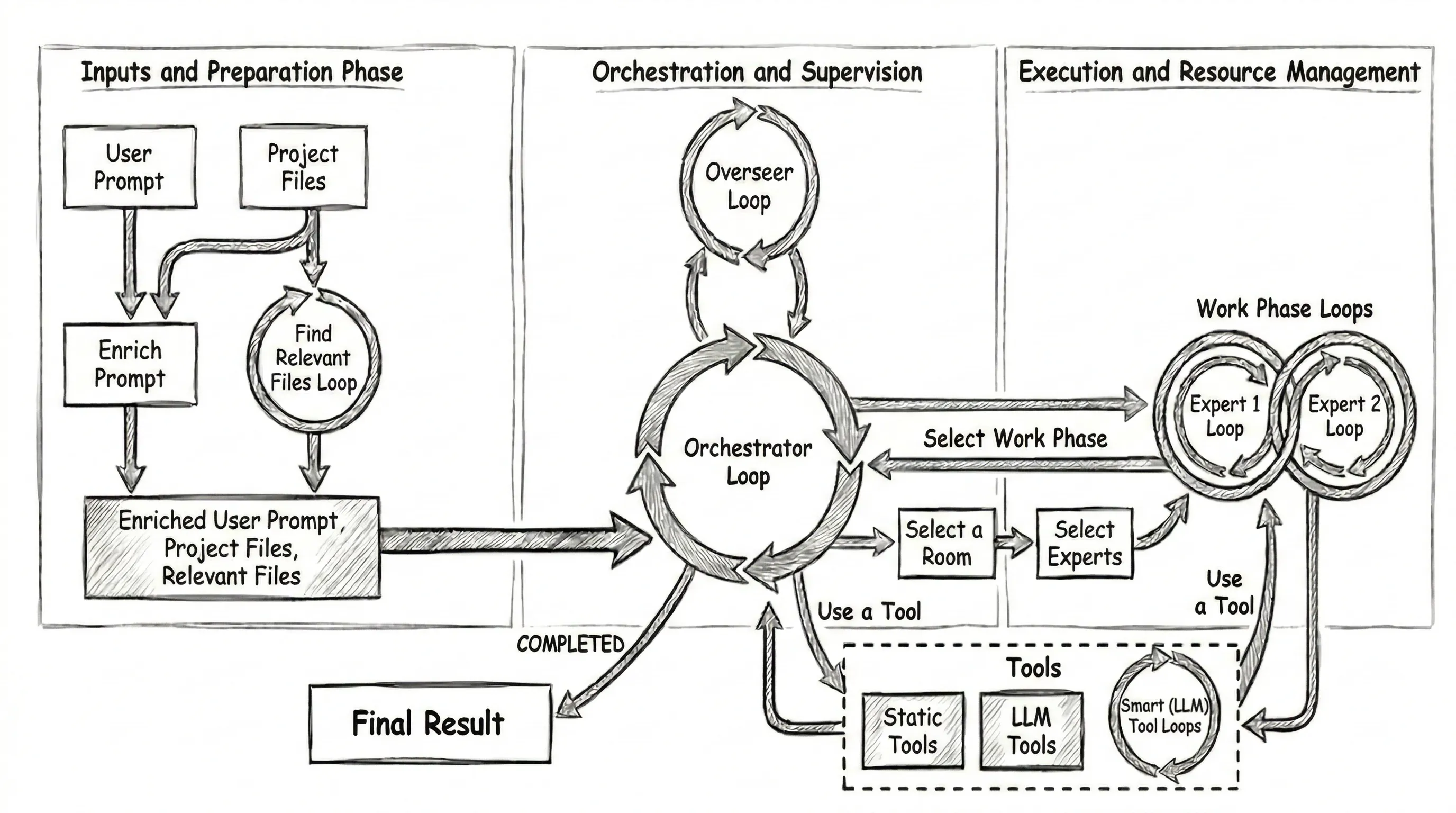
The basic work flow:
- The Orchestrator is given a user prompt and has instructions to break up the work and start Work Phases to complete each task.
- When the Orchestrator creates a new Work Phase to complete a task, we ask an LLM to: 2.1 Choose the most suitable “Work Phase Room” (Eg. Engineering, Documentation, Planning, …). 2.2 Choose two “Expert Personas” (Eg. Senior Engineer, Principal Researcher, Tech Writer, …) to collaborate.
- The Experts within each Work Phase take turns, collaborating on the problem via tool use and discussion until they agree the task is complete and they provide a report to the Orchestrator.
- The Orchestrator reviews the Work Phase report and continues creating new Work Phases. It’s instructed to start a Validation Work Phase when it thinks it’s finished, and to keep going until validation passes.
- If the Validation phase successfully validates the project, the Orchestrator summarizes the project work and finishes. If not, the Orchestrator keeps going until validation passes, or it becomes convinced the project is impossible.
- The harness provides the summary and a diff of all the file changes to the client.
The Orchestrator chat history is effectively a log of the tasks it has assigned to Work Phases and the results returned by those Work Phases. We also update the “static preamble” to include a unified diff of any changes and a list of the files that have been read or edited within any Work Phase. The context for the Orchestrator and each Work Phase are all isolated.
Work Phases and Experts
The selected Work Phase “Room” is a domain-specific preamble and a set of domain-specific tools; similarly, each selected “Expert” is a domain-specific preamble. The Room and Expert definitions can specify model meta-data (Ie. Model name and temperature) to further specify the expected behavior and requirements.
The Room and Expert preambles, tool instructions, assigned task, and overall project task are combined into “static” preambles representing each Expert—and then they take turns talking to each other and using tools. Like the Orchestrator, we update the preambles for each Expert so that their context always includes an up-to-date diff and list of relevant files.
There’s one more loop—the Overseer
The Overseer does have access to a lightly summarized log of the chat history in the Orchestrator and all of the Work Phases. The Overseer is scheduled to trigger automatically every ~15mins, primarily as a fallback to identify if the agent has gotten “stuck”. It can restart the project, abandon it completely, or provide hints or guidance to get “unstuck”.
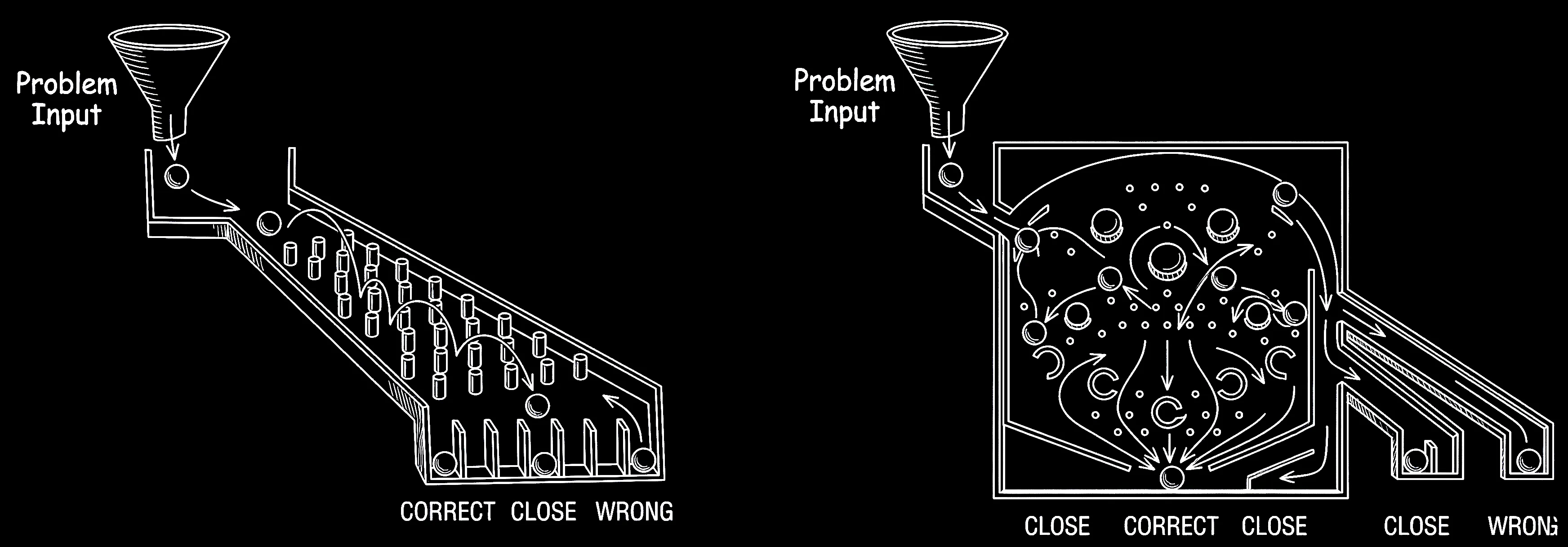
Hitting the side of a pinball machine to influence the ball without triggering a tilt is called nudging
Much like teams of people, you’re more likely to get consistent, high quality results if you increase the number of opportunities to identify and correct mistakes. Proof reading, code reviews, QA / Testing, and pair programming are all examples of creating opportunities to find mistakes and consider alternatives.
Nudging a pinball machine seems like cheating, but it’s a crucial, skillful technique used to change the ball’s trajectory, save it from draining down the sides, or set up a better shot. MoMoA uses the same approach to add a bit of ‘helpful chaos’ into the system and avoid some known issues with LLMs.
For example, we’ve observed the following common issues:
- Context becomes less effective as the amount of data in the context grows in size.
- LLMs are biased, struggle with self-reflection, are overly confident, and are too easily manipulated. They:
- Struggle to accurately judge their capabilities (or limitations).
- Can’t reliably judge if they have succeeded in completing an assigned task.
- Are biased towards their initial assumptions, but if told they are wrong (even if they aren’t), they’ll accept that feedback as truth.
- Can be easily sidetracked by “side quests”. If one small part of a larger task takes an unexpected number of turns, it often considers resolution of that small task as representative of overall success.
MoMoA improves quality and reliability by creating:
- Multiple opportunities to identify and correct mistakes.
- Independence between orchestration, execution, review, and validation.
- Extensive prompt engineering focused on specific skills / tasks / Tools.
As a result, there are multiple opportunities for MoMoA to recover from a hallucination, mistake, or garbage output from any given LLM call.
MoMoA improves quality and reliability by creating multiple opportunities to identify and correct mistakes
For a hallucinated snippet of code to make it into the final output, it has to survive a gauntlet of independent reviews: the partner Expert, the Orchestrator, future Work Phases, the Validation team, and the Overseer must all fail to notice the error. This sequence can still happen (particularly if the error is semantically correct, but logically false). But because they don’t share a chat history, they aren’t biased by the first agent’s confidence, reducing the risk of this cascade of failures.
As a result, the predominant “failure” cases for MoMoA is scope-mismatch based on the initial analysis: What it does is correct, but it’s either not everything you wanted / expected, or it’s more than you wanted. As a result, including the desired scope in the user prompt becomes really important!
Some context about context
A million tokens gets you about 5Mb which is a lot, but also… not that much. One of the most important aspects of the MoMoA is the independent context windows / chat histories of each of the Agents. Using independent subagents to manage context is a concept that’s gaining a lot of traction lately, and we really lean into it here, strictly enforcing a separation of concerns between Orchestrator, Work Phases, and Tools.
The Orchestrator does not have access to the chat history within the Work Phases it creates. It only gets the final response, and has access to the files that may have changed. Similarly, the Work Phases do not have access to the Orchestrator chat history, or the chat history of any other Work Phase. We even create ephemeral independent ReAct loops for some of the Tools, providing a short-lived Agent whose entire job is to fix tool-call syntax mistakes from the Experts.
This isolation is enforced for two reasons:
- It reduces the size of the context / chat history for each agent. For large, complex tasks a single Agent’s context window can fill up quickly, and a very large context can create problems. After a while the LLM can:
- Get confused by contradictory instructions, applying the wrong guidance to the wrong aspect of the work.
- Lose track of what has been planned, done, and which decisions have been made.
- Get distracted by ‘side quests’ that represent a disproportionate amount of the context.
- Require trimming and summarization that can further reduce the fidelity of the context and chat history.
- Get locked into a self-reinforcing echo-chamber based on the chat history itself.
- It allows much more detailed, specific prompting and instructions for each Room, Expert, and Tool without the risk of “confusing” the Agent by presenting all of these instructions all of the time.
As a result we (very) rarely need to trim the context within a given Work Phase or Tool. That said we do some additional context management to further reduce confusion by editing the chat history such that:
- Only the newest version of any viewed or edited file exists in any agent’s context.
- The “static preamble” is updated each turn such that the project context (Unified diff, available files, etc.) are always correct and up to date.
- Tools with large outputs (Ie. Bash logs) are always summarized before being added to the chat history.
Let them fight: Encouraging dissent between agents
We’ve also found that single-context agents are very unlikely to change course from their initial position as LLMs are paradoxically both extremely confident and extremely compliant:
- Once an Agent has made a decision, it is unlikely to question the validity of that assertion without external influence.
- If told it is wrong by a “user”, an agent is likely to accept that feedback without question.
- Agents can take user-instructions extremely literally, often fixating on a specific instruction that is peripheral to the overall goal (Eg. “The instructions say not to make changes to the project except to fix a bug, but the task involves adding a feature, which requires making changes to the project, I’m stuck!”)
The most powerful way to fix this is with Tools that represent the objective truth: Linters, Compilers, Tests, human-in-the-loop feedback, etc. But it doesn’t help you if the agent writes syntactically correct code that compiles and passes tests but doesn’t actually solve your problem.
Conflict via prompting
MoMoA tries to ‘nudge’ the system by positioning the Agents into opposition. Both Experts within a Work Phase Room are given this instruction:
When engaging with other room participants, actively question assumptions, point out potential problems, and propose alternative solutions. A direct, almost combative, yet constructive feedback style is expected and appreciated by all participants (including yourself).

Assume other contributors might have made mistakes or missed better alternatives. You have a specific  responsibility to re-verify any calculations, data transformation, examples, or assertions provided by others relative to any stated rules, logic, and project or task requirements.*

Pay close attention to feedback and suggestions directed at you, and incorporate valid points to improve your contributions.
Each Expert can then have specific instructions that conflict with the instructions of other Experts, encouraging a useful debate on the right approach. For example:
You’re the guardian of code quality, stability, and long-term maintainability. You prioritize proven, low-risk solutions, leveraging well-understood design patterns and established best practices. Your primary mode of contribution often involves meticulous code review, providing actionable feedback to ensure solutions are robust, scalable, efficient, and secure.You excel at innovation and finding novel solutions to complex problems. You actively explore unconventional approaches, experiment with modern technologies and techniques, and are willing to challenge established norms when you see potential for significant improvement. Your role is vital for pushing boundaries and overcoming challenging or ambiguous technical hurdles.If we give the Creative Developer a high temperature and the Conservative Developer a low temperature, we can add more creativity that’s tempered by the ensuing conflict.
Similarly, we can instruct specific Work Phases to actively question the work completed previously (Eg. Code Review and Validation). The Validation instructions include instructions to specifically look for scope creep or missing work:
Your primary responsibility is to rigorously validate whether the completed project meets all aspects of the original requirements defined by the project definition and any subsequent agreed-upon plans. You must identify any discrepancies, unmet needs, deviations, or any planned items/artifacts that are missing or incomplete.Adding skeptical tools
We can also create Tools prompted to specifically question assertions (or disambiguate when there’s confusion).
Ask an expert
The “Ask an Expert” tool is designed to provide deep, thoughtful analysis of a problem. The Orchestrator is instructed to Ask an Expert before starting the project in order to validate its plans, and the Validation Phase is instructed to Ask an Expert before it finalizes its response.
The Expert Tool is designed to use a larger model (Pro) and has access to the question it’s being asked, the initial user Prompt, the project files, and the unified diff—but not the chat history from the Orchestrator or Work Phase that invoked it. It’s prompted to be skeptical:
Analyze the problem carefully, question ALL assumptions and assertions, understand the underlying principles and ground truth, consider multiple perspectives, and offer comprehensive insights that will correct, unblock, and enable.

The LLM asking the question is usually _very_ confident in their observations -- even though those observation are sometimes *wrong*. You should take a skeptical position and question *every aspect* of the summary, comparing their assertions with ground truth, and showing your working to explain how you confirmed this.

It is very common that any contradictions identified within the problem statement are based on faulty assumptions, most commonly in the form of subtle distinctions. You should resolve such contradictions by considering the possibility that a stated fact may be wrong.
Resolve a paradox
The Paradox Resolution Tool is designed specifically to help the Orchestrator or an Expert get “unstuck”. Like the Ask an Expert tool it gets a request, the original user prompt, the files, and a diff.
The compliant nature of LLMs can result in the Paradox Resolver being biased by the framing of the question. To solve that, we put it through a filter that provides a contrary statement to the original question:
Please rewrite this problem summary so that it contradicts the assertions, assumptions, and observations made by the LLM. Use a structure, authoritative tone, and level of assertiveness consistent with the original summary.The Paradox Resolution tool is given both statements and the following instruction:
You are skeptical, question everything, and enjoy a socratic approach to problem solving that rejects the blind acceptance of any assumptions without data, evidence, and careful considerations. You will give considered and nuanced assistance to an LLM that is working on a complex problem, has found an apparent contradiction, and needs your help to resolve it. You will be presented with two contradictory problem summaries. Your goal is to review both very carefully and provide feedback that reconciles these perspectives. Question ALL assumptions and assertions, understand the underlying principles and ground truth, consider multiple perspectives, and offer comprehensive insights that will correct, unblock, and guide the work being done that's blocked by this contradiction.Extensibility and versatility
By defining different rooms, experts, and providing different specialist tools we can provide detailed instructions for specific tasks or domains.
A basic set of Rooms for an SDLC agent will include prompts designed specifically to optimize Planning, Engineering, Documentation, and Validation. By adding specific prompt instructions for a Creative Programmer, Conservative Programmer, Technical Writer, and Project Manager the Agent will dynamically create combinations optimized for specific tasks.
This set of Rooms, Experts, and Tools required for a SDLC Agent are actually a pretty great base for any agent that’s solving computation problems. You can imagine how we could add a Migration Expert prompted with advice on migrating between different languages or platforms, or a Researcher prompted to follow the scientific method.
Now imagine we want to build a Catering Agent to help create custom menus for big events. We’ll need:
- Bartender and Head Chef Experts
- A Catering Room
- Tools that provide access to known Recipes, to adapt recipes for different quantities of people, and to calculate costs based on your providers.
By isolating the instructions for specific tools, experts, and room tasks you can provide specific, custom, focused instructions for different use-cases without overloading the context window with irrelevant, potentially confusing instructions.
What if all tools are also agents?
If your tool provides good failure feedback a ReAct loop can iterate until it gets it right. Following our MoMoA approach to its inevitable conclusion, we can wrap tools in their own loop—hiding the details of the failure / retry loop so that the Expert calling the tool only gets the final result. We can even “fix” the chat history to reflect the ‘correct’ tool call.
In the linked code you’ll see how the Smart File Editor uses this approach.
Further observations and future experiments
We’ve generally found MoMoA to be capable of tackling projects of quite large scope. Part of that is practical—most ReAct loops see diminishing returns after 20-30 iterations, but MoMoA multiplies that by having a 20-30 iteration Orchestrator starting 20-30 iteration Work Phases(!).
That scope and the inherent extensibility and flexibility makes MoMoA a great harness for exploring and experimenting with Agents. In the coming weeks we’ll post some additional experiments built on the MoMoA architecture, like:
- What if we wrapped up other Agents—like Stitch, Jules, and the Gemini CLI and provided them as Tools for MoMoA agents?
- What if we added non SDLC experts, rooms, and tools? Could we create a researcher or an agent to handle migrating to new platforms or different languages?
- What if we set MoMoA to run in a continuous loop of software improvement?
A note on the code and the demo
Want to try it and share your feedback? Check out the repo or reach out to @julesagent, David East or Reto Meier for an invite code to try the hosted prototype.
All the code in the repo was written with extensive AI-assistance—there’s definitely code no human has ever reviewed—using a combination of the Gemini App, Jules, and the MoMoA prototype itself.