
What if an SDLC Agent could delegate tasks to autonomous Agents running in different host environments?
The Mixture of Mixture of Agents (MoMoA) experiment explored how dividing orchestration, sub-task execution, tool use, and validation into independent ReAct loops could help Agents solve complex SDLC tasks and conduct research.
Agentception added Smart Tools—autonomous Agents that supervised tool use—and the JulesTool to give our Agent an autonomous tool with a managed code execution environment.
Then the AgentBridge decoupled our Agent’s tool execution environments from its host environment, enabling distributed compute resources for resource intensive tools.
In this experiment we combine these concepts to create the Agent Smart Tool, a generalized version of the Jules Tool that lets our Agent assign tasks to autonomous sub-agents running within independent, distributed host environments.
Want to hear more about our motivations for this experiment? Listen to this clip from project lead Reto Meier.
The Agent Smart Tool generalizes the JulesTool
The Jules Tool uses the Jules API to perform SDLC tasks within Jules’s host environment. When you assign Jules a new task it:
- Provisions a new Jules environment with the specified project’s files.
- Starts a new Jules session by sending it a task to complete.
- Monitors messages from Jules to track updates and respond to questions.
- Determines when Jules is finished and reviews the suggested file changes (and applies them accordingly).
- Performs cleanup for the completed session.
Jules operates within its own cloud-based sandboxed execution environment, which includes the Jules Agent and agent harness.
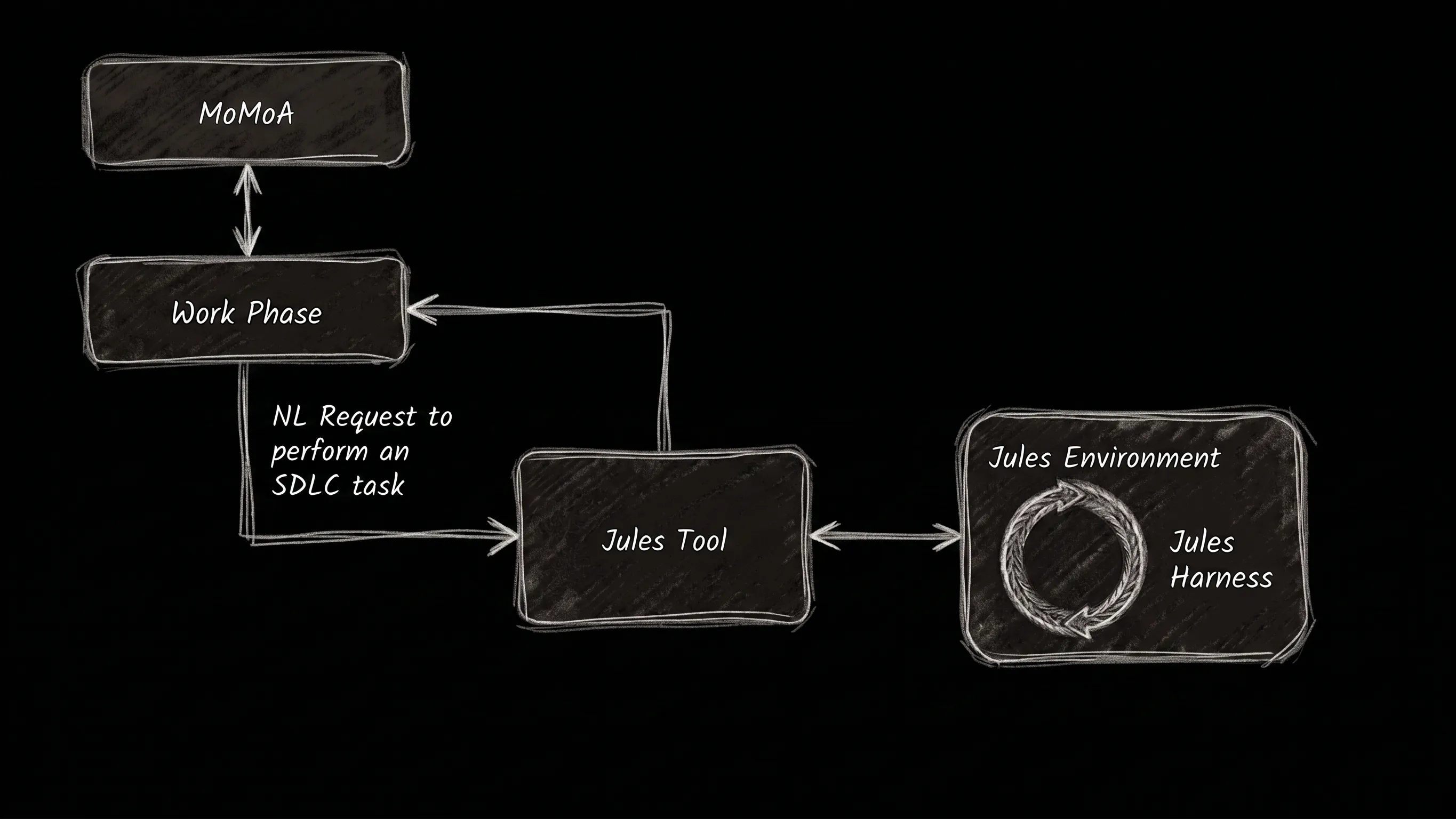
Figure 1. The Jules Tool uses the Jules API to complete SDLC tasks by starting and managing Jules Sessions.
The AgentTool provides MoMoA with the same ‘functionality’ as the Jules Tool, but instead of the Jules environment, agents, and harness it will be configurable—capable of running a variety of Agents within alternative environments.
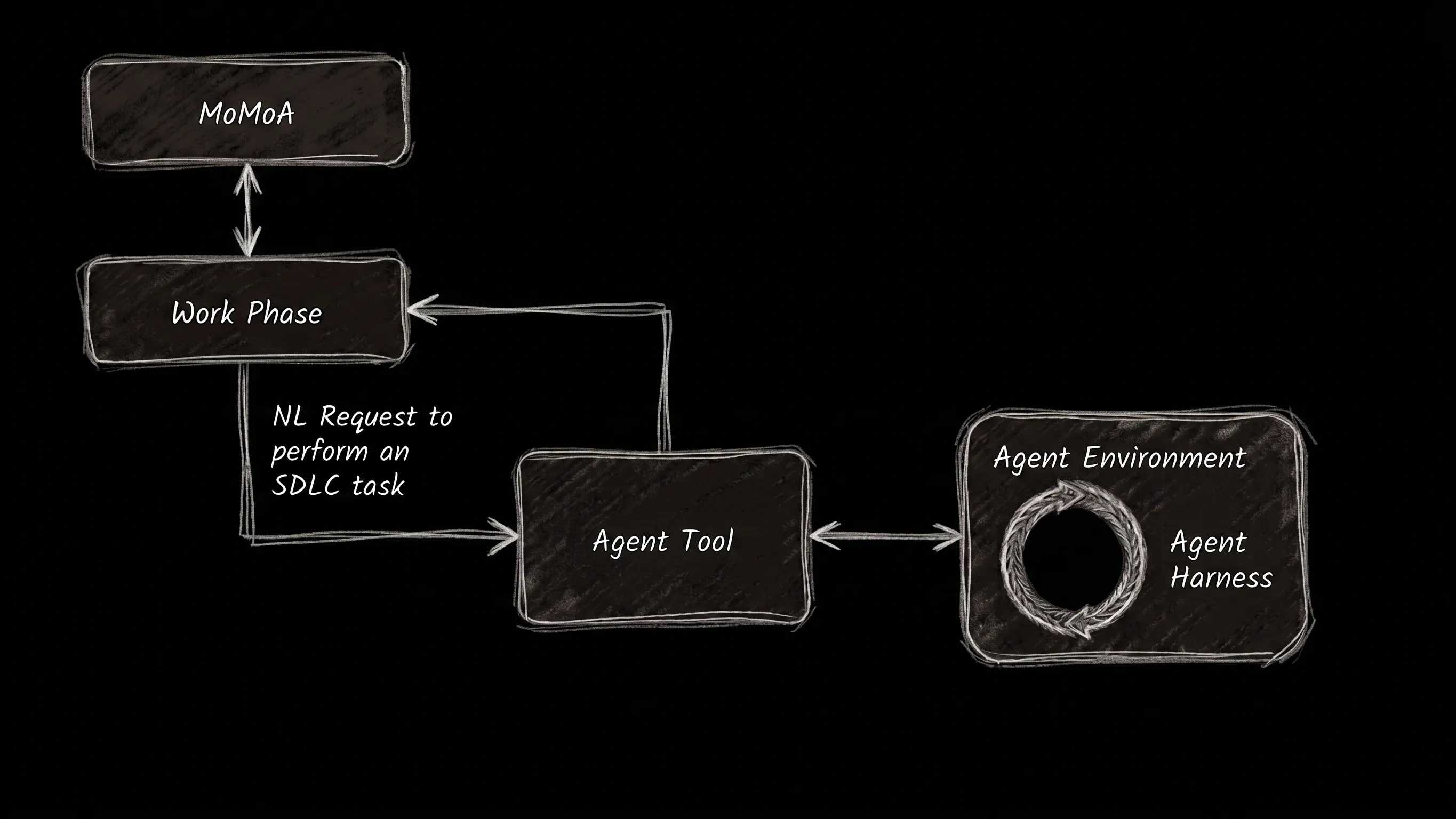
Figure 2. The Agent Tool.
To support this we will build:
- An interface for Agent host environments.
- An interface for Agent runtimes.
- A harness to enable running different Agents in different host environments.
- The
AgentToolto connect it all together, receive and assign tasks, and report the results.
Any environment capable of running an Agent can be an Agent Environment
Agent Environments can include ephemeral cloud providers (E.g. E2B and Cloud Run), persistent environments (E.g. Cloud Workstations), or even local (or remote) Docker containers.
interface AgentEnvironment {
  providerName: string;
  getAgentName(): string;

  // 1. Prepare the agent's environment
  provision(files?: FilePayload[], additionalDependencyInstallCommand?: string): Promise<void>;

  // 2. Start the agent harness session.
  startSession(timeout?: number): Promise<AgentSession>;

  // 3. Clean up the environment
  teardown(): Promise<void>;
}
Each Agent Environment implements a way to start an AgentSession within it. An Agent Session provides a consistent interface for the Agent Tool to use for sending and receiving messages (and errors) from the Agent from within the Agent Environment.
interface AgentSession {
  sessionId: string;
  connectionUrl: string;

  sendMessage: (data: any) => Promise<void>;

  onMessage: (handler: (data: any) => void) => void;
  onError: (handler: (error: Error) => void) => void;

  wait: () => Promise<void>;
  kill: () => Promise<void>;
}
The AgentTool uses the AgentEnvironmentProvider to instantiate an Agent Environment, provision it with the project files, start an Agent Session, and then monitor (and respond to) messages, review final file changes, and clean up.
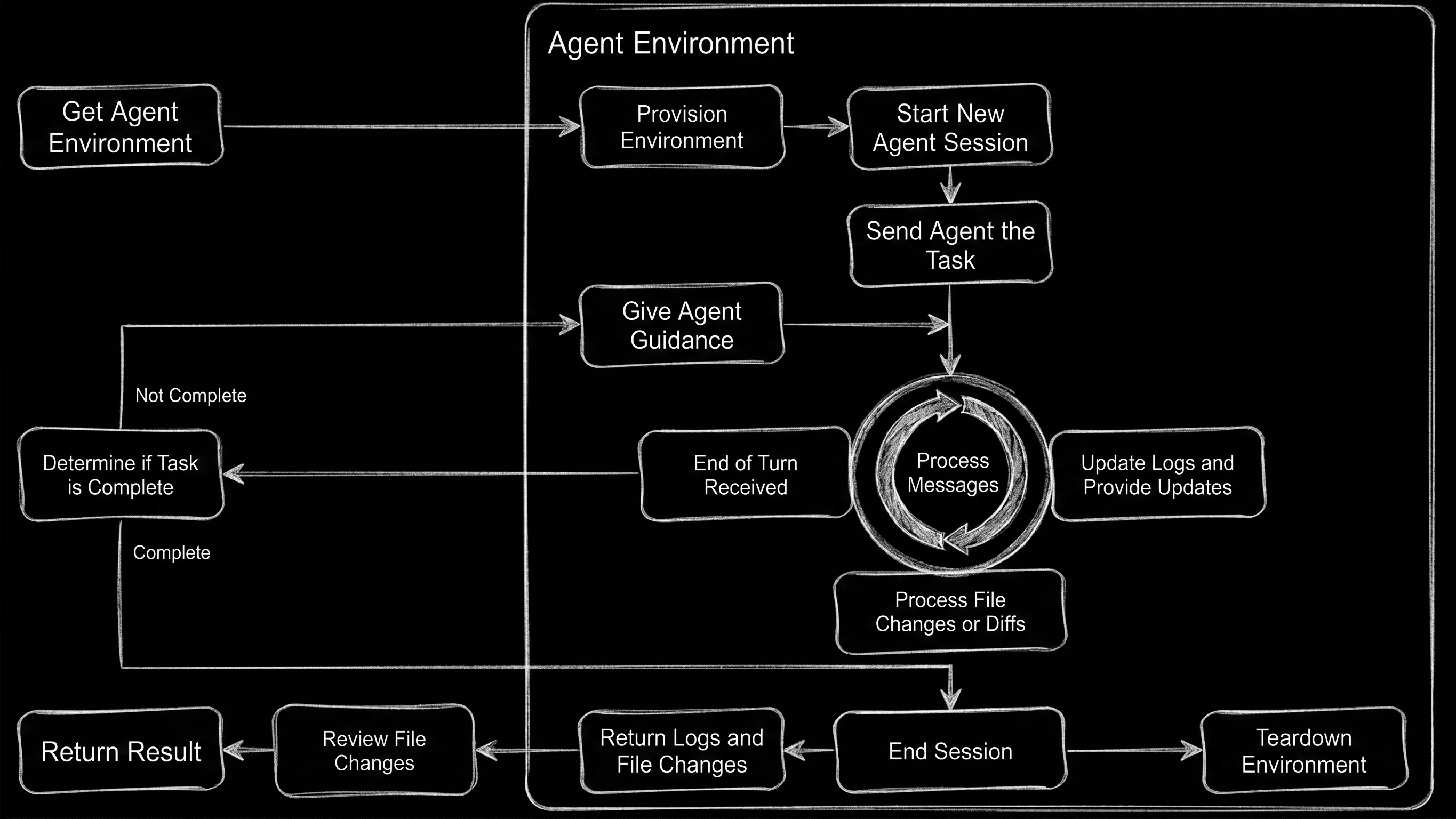
Figure 3. The Agent Tool dataflow.
Jules provides its own Agent runtime and harness, but we’ll need to install them into our Agent Environments
The AgentConfig interface includes the files, environment variables, and commands required to install and run the Agent it represents (E.g. The geminiCLIAgentConfig).
export interface AgentConfig {
  files?: FilePayload[];
  agentName: string;
  command: string;
  authMethodId?: string;
  envs?: Record<string, string>;
  installer?: string;
}
The acpSandbox module defines a NodeJS app that acts as our Agent Harness (or ‘session runner’). It uses ACP (Agent Communication Protocol) to provide a consistent monitoring and control plane that we can use for any of the Agents we want to run within the harness..
Within each environment, the harness is responsible for:
- Spawning the Agent as a child process.
- Initializing the ACP Connection.
- Connecting to the Agent’s stdin / stdout and mapping them to an NDJSON (Newline Delimited JSON) stream.
- Hosting the durable stream that the Agent Tool will use to listen for messages and send requests.
- Receiving messages from the Agent Tool and translating them to ACP methods that it sends to the Agent.
- Intercepting (and enabling) terminal command and file access requests from the Agent.
Use our existing Execution Providers to simplify provisioning
Provisioning an Agent Environment includes installing the ACP Agent Harness and using the selected Agent Config to install the Agent, as well as copying the project files. When available, we utilize the stageFiles method of the relevant ExecutionProvider.
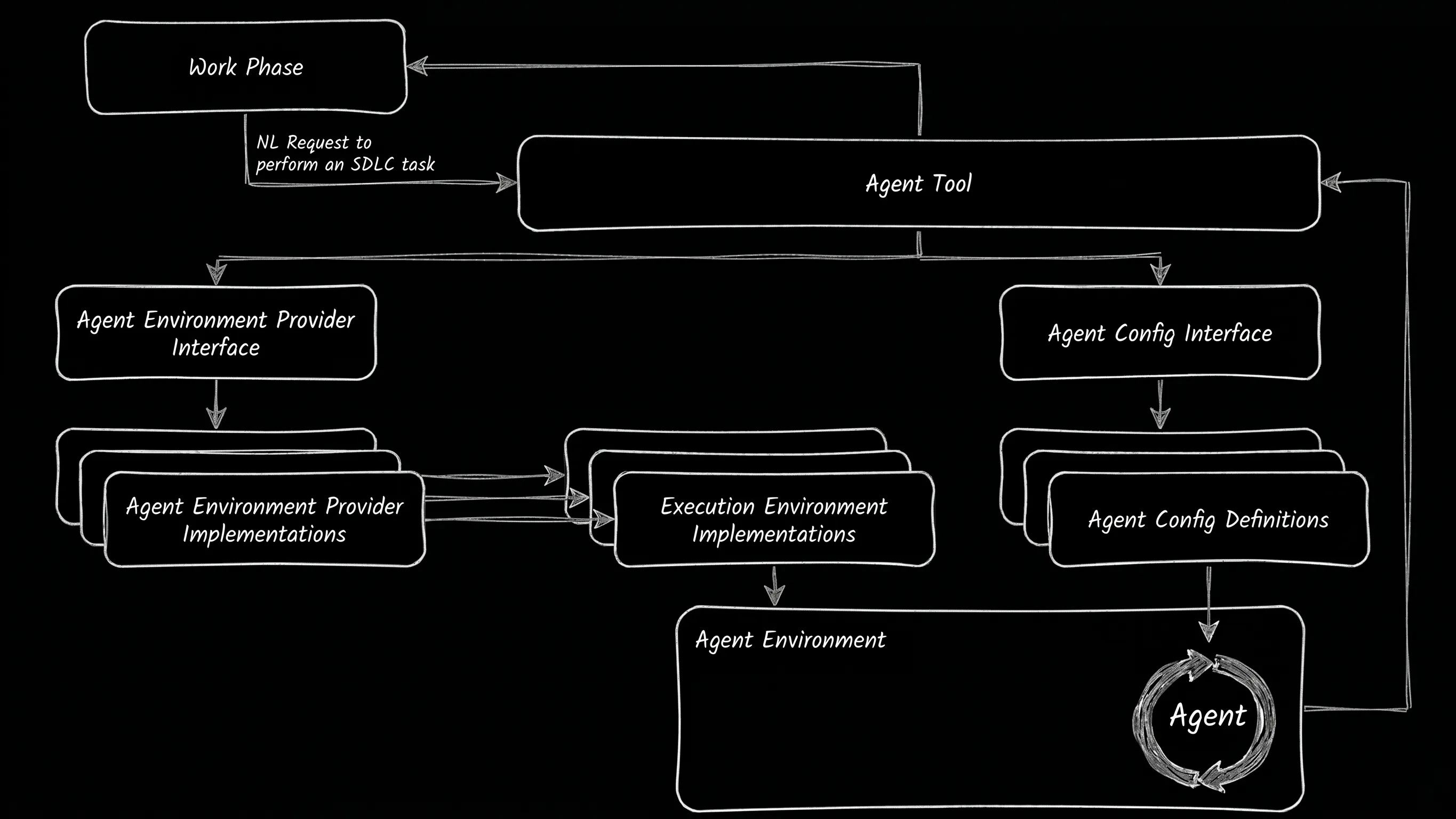
Figure 3. Provisioning the Agent Runtime and ACP Agent Harness.
The Agent Tool determines if the session is finished and reviews file changes
The Agent Harness notifies the Agent Tool when it thinks the sub-agent may be finished.
Is the task fully completed based on the transcript above?
1. If the agent is asking a question or needs clarification, it is NOT complete.
2. If the agent says "I have finished" or similar, and it seems reasonable, it is COMPLETE.
3. If the agent is stuck or providing incomplete info, provide guidance.
4. If the agent is stuck in a repeating loop, it is COMPLETE.

Respond with JSON:
{
"complete": boolean,
"reply_to_agent": "Your message to the agent here (if not complete)",
"reasoning": "Why you made this decision"
}
It also checks for changes to the file system, and provides a diff to the Agent Tool, which is responsible for determining which (if any) of the files changes or additions should be incorporated into the ongoing project.
Decide if these changes should be applied.
Options:
1. **ACCEPT_ALL**: Apply all changes.
2. **REJECT_ALL**: Apply nothing.
3. **ACCEPT_PARTIAL**: Apply only specific files.

Respond with JSON:
{
  "decision": "ACCEPT_ALL" | "REJECT_ALL" | "ACCEPT_PARTIAL",
  "reasoning": "Explanation...",
  "files_to_apply": ["file1.ts"]
}
The Agent Harness makes it possible to use any ACP compatible agent within any of the Agent Environments we implement
In this experiment we have an Agent Config for the Gemini CLI and Agent Environments for E2B, CloudRun, Cloud Workstations, and a Local Docker container. The Agent Bridge experiment includes a Remote Desktop Execution Provider, which could form the basis of a Remote Desktop Agent Environment.
In addition to the Gemini CLI, we could add agent configurations for Claude or Codex, or build an ACP wrapper for the Antigravity CLI.
Different Agents and remote host environments are better suited to different tasks
There’s no requirement to bind our distributed agents to a single tool, nor do we have to use the same agent and environment within a given MoMoA session.
We could expand the use of our distributed agents by:
- Enabling all the MoMoA Smart Tools to operate in specified remote environments.
- Using an LLM to determine the best Agent and host environment for each Agent Tool (or any Smart Tool) invocation.
- Distributing the execution of each Work Phase to different Agents and host environments.
- Creating a swarm of different agents running in different host environments for any given task.
One of the great things about Jules is that you don’t have to configure and manage your own environment or agent
Jules also provides a generous VM and restricts usage by task (total and concurrent) rather than compute seconds or tokens, which can make it especially useful for long running agentic tasks that don’t require a custom environment or significant compute resources.
For example, while doing this experiment we wondered, “What if we used Jules as a smart Execution Provider?”. The
JulesExecutionProvidershows that you can prompt Jules to manage the execution of a batch of computation functions the same way our vanilla Execution Providers do.
What if we could utilize the convenience of a Jules-like API, with the power to configure the host environment based on our computational needs—plus the option to bring our own agent?
A single API that:
- Lets you configure the cloud-VM you want to use,
- Comes preconfigured with an Agent Harness capable of coordinating multiple pre-installed or BYO agents
As we explore future experiments, we’d love to know if you would find an API like that useful? Potential features could include:
- Instant startup and shutdown, with and per-second billing for non-standard configurations.
- Configurable CPU and memory specifications per session using the same underlying persistent user files and config.
- A simple API for controlling the VM, transferring files, and assigning Agent tasks.
- Built-in Agent (and inference) with support for selecting from multiple local and API-based inference models / services.
- Persistent userspace and the ability to SSH into the VM to configure the dev environment (like Cloud Workstations).
What would you prioritize? What’s missing?
Now you can scale your Agent workloads
Local agents are inherently bound to local resources, and cloud Agent services are bound to their host environment’s resources. If we bind the resources available for each task and tool to what’s available to our Agent, we either end up underpowering the tools or paying for more resources than we generally need.
The ability to distribute and parallelize Tools and Work Phases across local and remote host environments makes it possible to scale our Agent’s work horizontally (by delegating more tasks that will be completed in parallel), and vertically (by providing more compute resources for tasks that require them.)
We can take advantage of a cloud-based Agent with a conservative host environment to coordinate long-running tasks without needing to keep our laptop open, while having a mechanism to utilize the compute power of our laptop and on-demand cloud services.
A note on the code
All the code in the repo was written with extensive AI-assistance—there’s definitely code no human has ever reviewed—using a combination of the Gemini App, Jules, and the MoMoA prototype.